Motion detection
Planned activity zones would help focus on a doorway, driveway or storage area instead of every change across the whole frame.
 VISIONLINKS
THE VISIONLINKS AI STORY
Use AI-assisted detection and alerts to keep track of activity around your cameras and review the moments that need your attention.
Enable AI detection and alerts in your settings. Some advanced scenarios described below are planned and depend on your setup.
Explore the use casesCheck the scene. Decide what happens next.
FROM ACTIVITY TO CONTEXT
Planned activity zones would help focus on a doorway, driveway or storage area instead of every change across the whole frame.
Live camera overlays can distinguish people and cars from general movement, without identifying a face.
Planned rules could combine an entry-zone event with Away status or closing hours. An alert would flag activity to check, not declare someone an intruder.
AI ALERTS IN ACTION
When a person is detected indoors in Away mode, an alarm can help you review the activity in VisionLinks.
With automatic Away alarm recording enabled, an alarm can start cloud recording for supported cameras, so you can review the activity later.
Open the alarm in VisionLinks, check the camera and time, and review the available recording before deciding what to do next.
Enable AI alerts and automatic event recording in settings. Recording availability and retention depend on your camera setup and plan.
VISIONLINKSExample web app view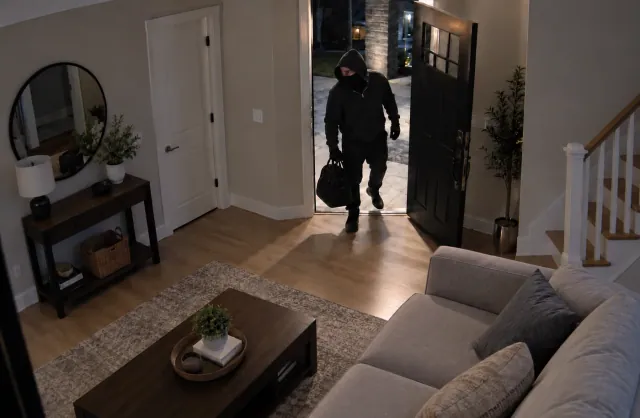 Indoor camera
 · Away mode
PARKING MONITORING
A future parking alert could help you review an unfamiliar car parked in your space. The example below illustrates the idea.
Live overlays can highlight detected cars in the camera view, helping you check activity around your parking space.
Check the camera and time, then review available recordings for arrivals, departures or nearby activity. Recording availability depends on your setup and plan.
Dedicated parking rules and alerts for unfamiliar cars are planned features. Vehicle detection does not identify the owner or confirm that a car is unauthorized.
VISIONLINKSExample web app view Parking camera
 · Review activity
DIFFERENT PLACES. DIFFERENT PRIORITIES.
Homes
An entry-zone camera notices a person while your home is set to Away.
A planned alert would highlight the camera, time and relevant clip so you can check what happened.
Use a manual Away switch or a schedule. A visitor is not automatically an intruder.
Restaurants
Movement appears near a back entrance or storage area outside opening hours.
Planned zone and schedule rules would surface an event for the owner to review.
Focus on entrances and property security, rather than staff performance or private areas.
Summer cottages
A person approaches your cottage entrance while the property is unoccupied.
Planned person detection would help you review relevant activity instead of every moving branch.
Keep cameras aimed within your property. Delivery drivers and neighbours may have a legitimate reason to visit.
Shops and small businesses
People enter and leave a defined doorway during business hours.
Planned entry and exit counts would help show visit patterns without naming individual customers.
Counts would be estimates and can be affected by crowds, lighting and camera placement.
A LITTLE CONTEXT GOES A LONG WAY
Choose a camera zone, opening hours or a manual or scheduled Away status.
Planned detection would highlight motion, person or vehicle events that match your settings.
Check the event and the available footage. You decide whether it needs a response.
ASSISTANCE, NOT ASSUMPTIONS
AI can miss events or raise false alerts. Weather, lighting, camera angle and visitors all add uncertainty. The goal is to support your decisions, not replace them.
This roadmap does not require facial recognition or resident identification. Keep camera coverage appropriate to your property, respect people around you, and choose recording retention deliberately.
Read our privacy policy →START WITH WHAT IS AVAILABLE TODAY
Connect your cameras, watch live, and enable AI alerts and recording for your setup.